If you have a shop, office or clinic, LocalBusiness schema states your business details in a format search engines read directly. If you sell online, Product schema can put your price, stock and rating right in the search result. These are the two types worth adding first for most businesses in India.
If schema is new to you, start with schema markup for beginners, which explains what it is and how to test it.
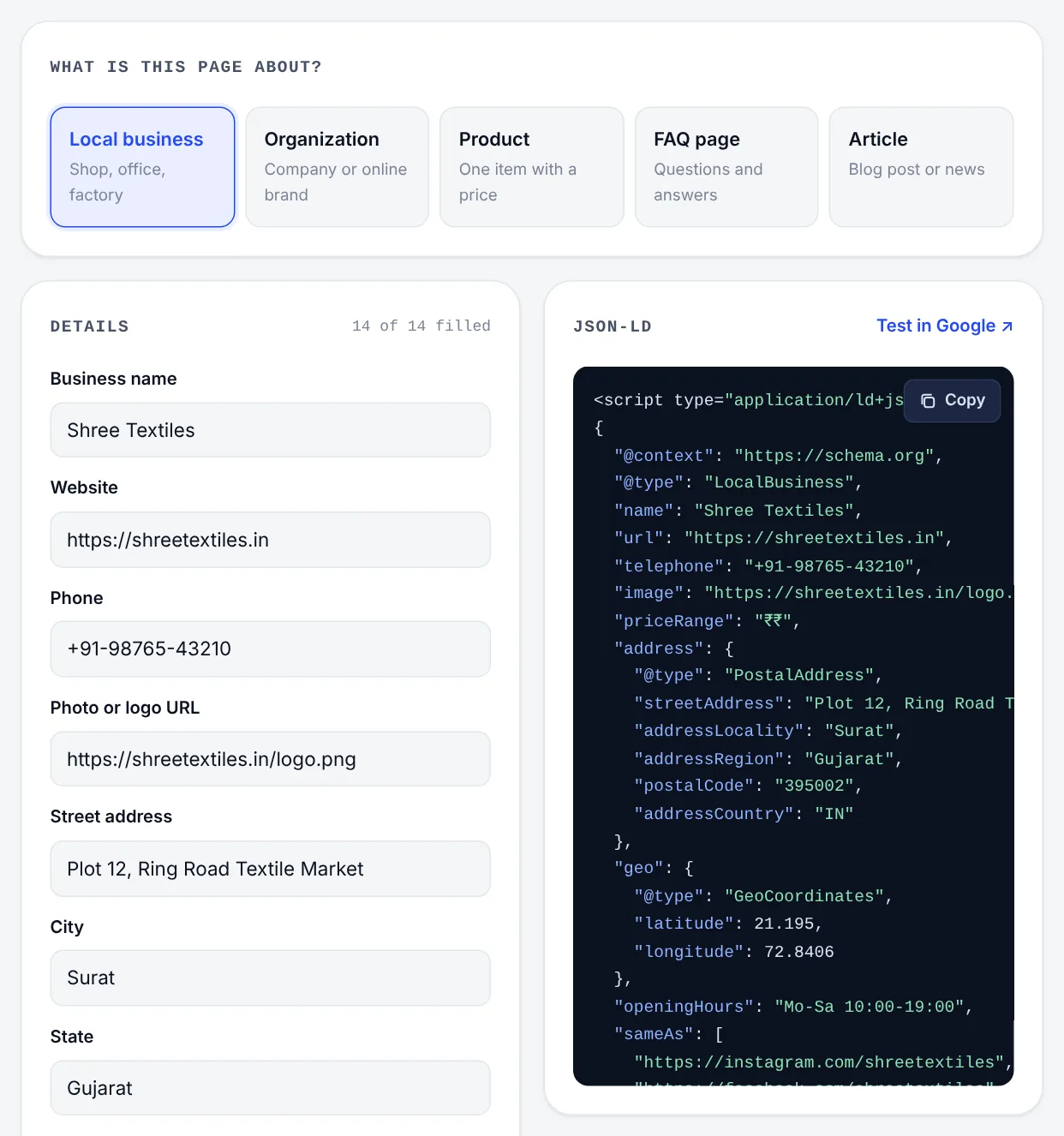
LocalBusiness schema
LocalBusiness helps search engines connect your website with your Google Business Profile and your listings on other sites. A complete example for a shop:
{
  "@context": "https://schema.org",
  "@type": "ClothingStore",
  "name": "Shree Textiles",
  "url": "https://shreetextiles.in",
  "telephone": "+91-98765-43210",
  "image": "https://shreetextiles.in/images/shopfront.jpg",
  "priceRange": "₹₹",
  "address": {
    "@type": "PostalAddress",
    "streetAddress": "Plot 12, Ring Road Textile Market",
    "addressLocality": "Surat",
    "addressRegion": "Gujarat",
    "postalCode": "395002",
    "addressCountry": "IN"
  },
  "geo": { "@type": "GeoCoordinates", "latitude": 21.1950, "longitude": 72.8406 },
  "openingHours": "Mo-Sa 10:00-19:00",
  "sameAs": [
    "https://www.instagram.com/shreetextiles",
    "https://www.facebook.com/shreetextiles"
  ]
}
Wrap it in a <script type="application/ld+json"> tag on your home page or contact page.
The fields, in order of importance
Must have
- @type: the most specific type that fits, such as
Dentist,Restaurant,ClothingStore,Plumber,HomeAndConstructionBusiness,AccountingServiceorBakery. All of them are kinds of LocalBusiness and accept the same fields. - name: exactly as on your signboard and Google Business Profile.
- address: street, city, state, PIN code and country code
IN, in the same format you use everywhere else.
Strongly recommended
- telephone, with the +91 country code.
- url, your website's main address.
- openingHours, or the more detailed
openingHoursSpecificationwhen hours differ by day. - geo, the latitude and longitude. Right-click your entrance in Google Maps to copy them.
- image, a real photo such as the shopfront.
Useful extras
- priceRange, a rough guide like
₹₹or₹500–₹5,000. - sameAs, links to your official social profiles and listings, to confirm they're all the same business.
- areaServed, the cities or regions you cover, for businesses that travel to customers.
- logo and email.
- aggregateRating, but only if real reviews are shown on the page itself.
Several branches
Give each branch its own page, such as /branches/vadodara, with its own LocalBusiness block, address, phone and hours. Don't put several addresses in one block on the home page.
Service-area businesses
If customers don't visit you, as with pest control, painting or waterproofing, you can leave out the street address and list where you work:
"areaServed": ["Ahmedabad", "Gandhinagar"]
Keep this consistent with your Google Business Profile, where you can also hide the address and show a service area instead.
Product schema
For online shops, Product schema has the most visible payoff. Google may show your price, availability, rating, shipping and returns in results and in its shopping features. Valid markup makes a page eligible. Google decides when to show it.
{
  "@context": "https://schema.org",
  "@type": "Product",
  "name": "Red Banarasi Silk Saree with Gold Zari",
  "image": [
    "https://shreetextiles.in/images/red-banarasi-front.jpg",
    "https://shreetextiles.in/images/red-banarasi-pallu.jpg"
  ],
  "description": "Handwoven pure silk Banarasi saree with gold zari border and matching blouse piece.",
  "sku": "BNR-RED-014",
  "brand": { "@type": "Brand", "name": "Shree Textiles" },
  "offers": {
    "@type": "Offer",
    "url": "https://shreetextiles.in/sarees/red-banarasi-silk",
    "price": "8499",
    "priceCurrency": "INR",
    "availability": "https://schema.org/InStock",
    "itemCondition": "https://schema.org/NewCondition"
  },
  "aggregateRating": { "@type": "AggregateRating", "ratingValue": "4.7", "reviewCount": "38" }
}
The fields that matter most
- name: the product name as shown on the page.
- image: one or more good product photos. Google prefers several aspect ratios when you have them.
- offers: the price block:
- price: a plain number like
8499, with no ₹ symbol or commas. - priceCurrency:
INR. - availability:
InStock,OutOfStock,PreOrderorBackOrder, written as a schema.org address.
- price: a plain number like
- description, sku and brand identify the product exactly.
- gtin or mpn, if your products have barcodes or manufacturer part numbers.
- aggregateRating and review, only for real customer reviews shown on the page.
Keep product markup accurate
- Match the visible page. If the page shows ₹7,999 on sale, the markup can't say ₹8,499.
- Generate it automatically. Prices and stock change every week. Markup produced by your store platform from your product data stays correct. Hand-written markup goes stale.
- Real reviews only, visible on the page and not hand-picked.
- One product per product page. Don't mark up every item on a category page as if each were the main product.
Platforms and Merchant Center
- Shopify: most themes output Product schema. Check it before adding an app that creates a second copy.
- WooCommerce: outputs Product schema, and SEO plugins can extend it.
- Custom stores: build the JSON-LD from the same data that renders the page.
You can also upload a product feed to Google Merchant Center, which can list your products in Google Shopping for free. Merchant Center reports any mismatch between your feed and your page's schema.
Mistakes to avoid with both types
- Details that don't match the page or your Google profile. If the footer shows one phone number and the schema another, both look less trustworthy.
- Ratings that aren't on the page. Copying your Google rating into schema without showing reviews on the page breaks Google's rules.
- Keywords in the name.
"name": "Shree Textiles Best Saree Shop Surat"breaks the same rules as a keyword-stuffed Business Profile name. - Duplicate blocks from a theme and a plugin at once.
- The wrong page. The business block belongs on pages about the business, not on every blog post. Product markup belongs on product pages.
Build and test it
- Open the Rankdesk schema generator and choose Local business or Product.
- Enter your website. The generator reads the page and fills in your name, phone, address, social links and any schema you already have.
- Check every field against your signboard, Google Business Profile and product page.
- Copy the JSON-LD into the page.
- Test the live page with Google's Rich Results Test and fix any warnings.
Local schema works best with a complete Google Business Profile and the same name, address and phone number everywhere online, which the local SEO checklist covers.